
Yes. Configured mail workflow software can identify candidate urgent legal notices and alert an assigned owner before a reviewed response deadline. The process needs message and attachment capture, urgency triage, owner routing, deadline verification and scheduled alerts. Test detection and delivery in the configured environment, and have counsel verify the legal timing basis.
The operational goal is straightforward: the right person should see a potentially urgent notice early enough to investigate, obtain advice, coordinate a response and preserve proof. A message marked “important” is only the start of that process.
This guide explains how to build that chain and where Gotham helps today. It distinguishes the email capture step from legal intake, professional deadline review and matter reminders. For the complete notice lifecycle, see our legal notice management workflow.
How does urgent legal notice detection and owner alerting work?
Build the process as a series of accountable handoffs:
- Capture: preserve the message, attachments and observed receipt evidence.
- Detect: flag potential legal notices and send unreadable material for review.
- Assign: route the request to a responsible owner with backup coverage.
- Verify: distinguish the sender's demand from the reviewed response deadline.
- Alert: notify eligible owners early enough to prepare, approve and deliver the response.
- Close: retain the approved response, dispatch proof and outstanding follow-up.
Each handoff needs a visible exception path. An unreadable attachment, unassigned request or failed alert should remain visible to the team responsible for resolving it.
What should a mail workflow recognise as an urgent legal notice?
Use several signals together: a demand for action, a stated response date, an apparent court or regulator, a proceeding reference, an allegation of breach or a threatened disruption. Search the available message and attachments, with a review path for material the system cannot read.
The subject line may simply say “Documents” while the attached scan contains a deadline. A long forwarded thread may quote an old notice whose date no longer describes the latest communication. An automated acknowledgement may contain legal terminology without requiring any response.
| Signal | Appropriate next step | What still needs review |
|---|---|---|
| A stated deadline or imminent hearing | Flag for prompt legal attention | What the date means and whether it applies |
| Court, regulator or tribunal named | Route to the responsible specialist | Sender identity, forum and underlying record |
| Breach, termination or cure demand | Link the relevant contract for review | Trigger, notice mechanics and available response |
| Missing or unreadable attachment | Create a visible exception | The contents of the original material |
| Repeated copies of a notice | Link or deduplicate with care | Whether any version contains a new attachment or date |
Give staff a manual escalation route for anything they believe may be serious. The detection process should help them get attention even when the software's classification is uncertain.
Why ordinary inbox rules cover only part of the job
Email rules are useful for collecting likely candidates. Google documents Gmail filters for actions such as labelling and automatic forwarding. Microsoft documents Outlook message rules that act on conditions including sender, subject or body text and importance.
A legal response process needs additional records: the responsible owner, reviewed timing basis, required inputs, approval status and delivery evidence. Design a clear handoff from the mailbox to those records, including a failure route when an attachment or import cannot be processed.
Avoid a rule that removes potentially urgent correspondence from view before somebody has accepted responsibility. A tidy inbox is a weak measure of whether a notice is being handled.
Step 1: Preserve the communication as received
Capture the original message, headers where available, attachments, observed arrival time and any delivery or portal evidence. For physical post, preserve the envelope and record how it reached the organisation. Record when a business team first received the material separately from when it forwarded it to Legal.
If a notice arrives through several channels, retain the relationship among those copies. The earliest observed receipt may matter to the review, but software should not silently decide which event has legal effect.
An incomplete import should stay visible. If the body uploads but an attachment fails, record the missing file and assign recovery. Proceeding as though the notice is complete can hide the very document that creates urgency.
Step 2: Triage for attention and assign a named owner
Set an internal target for initial review according to your team's coverage and risk policy. A candidate with an imminent stated date should reach the duty owner even if its classification is uncertain. Define a backup for absence and a path for requests that remain unassigned.
Choose the owner using business entity, subject, jurisdiction, existing matter and access restrictions. A request involving employee information or a sensitive dispute may need a narrower audience than the general legal queue.
The owner should be able to accept the work, request reassignment and identify the next decision. A notification delivered to a shared mailbox does not establish that somebody has taken responsibility. Our legal intake triage guide explains the intake controls in more detail.
Step 3: Keep internal targets separate from legal deadlines
Maintain distinct fields for the date asserted in the notice, the observed receipt event, the reviewed response deadline and your team's internal preparation targets. Each serves a different purpose.
For example, a sender may demand a response “within seven days.” Counsel must assess the demand, underlying agreement or legal procedure, relevant event and applicable calculation rules. An operations coordinator can set a prompt review target immediately while that assessment is underway.
Once reviewed, the deadline record should preserve the source, trigger, calculation, timezone, assumptions and confirming reviewer. If the conclusion changes, retain the previous value and the reason. Use our legal deadline docketing guide to structure that review.
Keep uncertainty operationally visible. “Deadline awaiting legal review” should have an owner and an escalation path; it should not disappear from the team's workload simply because no date has been confirmed.
Step 4: Alert the owner with enough context to act
The first alert should identify the request or matter, urgency, required next step and a link to controlled source material. Tell the recipient whether a date is sender-stated, provisional or confirmed. Include the time remaining only against the appropriate reviewed basis.
For example, an initial alert might say:
Potential urgent legal notice. Owner: Duty counsel. Timing: The sender requests a response by 30 October; legal deadline review is pending. Next action: Review the original notice and attachments. Internal review target: Today, under the team's triage policy. Source: Open the controlled matter record.
After counsel confirms the timing basis, the response-deadline alert can identify the confirmed date, required preparation step and responsible person. Keep the original sender-stated date available in the record so the team can reconstruct the review.
Avoid placing the full notice, private employee details or privileged strategy into an email subject or broadly visible notification. The notification can direct an authorised owner to the controlled record.
Build separate checks for alert dispatch, delivery problems and owner acknowledgement. If an alert is rejected, the process needs a visible recovery route. If it is delivered but nobody accepts the work, the operational problem is ownership and coverage.
Step 5: Coordinate the response before the final reminder
A response often depends on business records, finance information, contract history and a decision by counsel. Work backwards from the confirmed deadline to plan those inputs and review stages.
An illustrative sequence is:
- Preserve and review the notice and source record.
- Confirm the owner, coverage and deadline basis.
- Request the necessary facts and documents.
- Prepare a draft response or decision note.
- Obtain legal and business approval as required.
- Dispatch using the approved channel.
- Save the sent version, approval and delivery evidence.
- Decide what continuing monitoring or follow-up remains.
Escalate a missing input while there is still time to act. The final deadline reminder should arrive after preparation has been organised, rather than revealing for the first time that a response is needed.
Worked example: A supplier's alleged breach notice
Assume a hypothetical supplier emails an account manager with a PDF alleging non-payment and requesting a response by 30 October. The message is forwarded to the legal intake process. The intake record preserves both the original arrival and forwarding timestamps.
The triage owner marks it for prompt attention and assigns responsible counsel with a backup. Finance is asked for payment records. Counsel reviews the agreement, the notice wording and the relevant facts before confirming how the response should be handled.
If counsel confirms an operational response deadline, the coordinator records its basis and sets earlier targets for the finance input, drafting and approval. The final sent response and dispatch evidence remain linked to the matter.
If a later message changes the request, the team reviews its effect and updates the record deliberately. The earlier notice and timing decision stay available for reconstruction.
What Gotham does in this process
Gotham is an AI workspace for legal and accounting teams. Documents, matters, research, work product and workflows sit within a shared working context. For notice handling, the useful connection is between the captured material, the people reviewing it, the work required and the confirmed matter dates.
Gotham's Legal Front Door provides a request queue for triage, assignment and service tracking. The current live interface explicitly describes Slack requests and shows owners, priority, status and targets, with views including Untriaged, Mine, Team, At risk and Waiting.
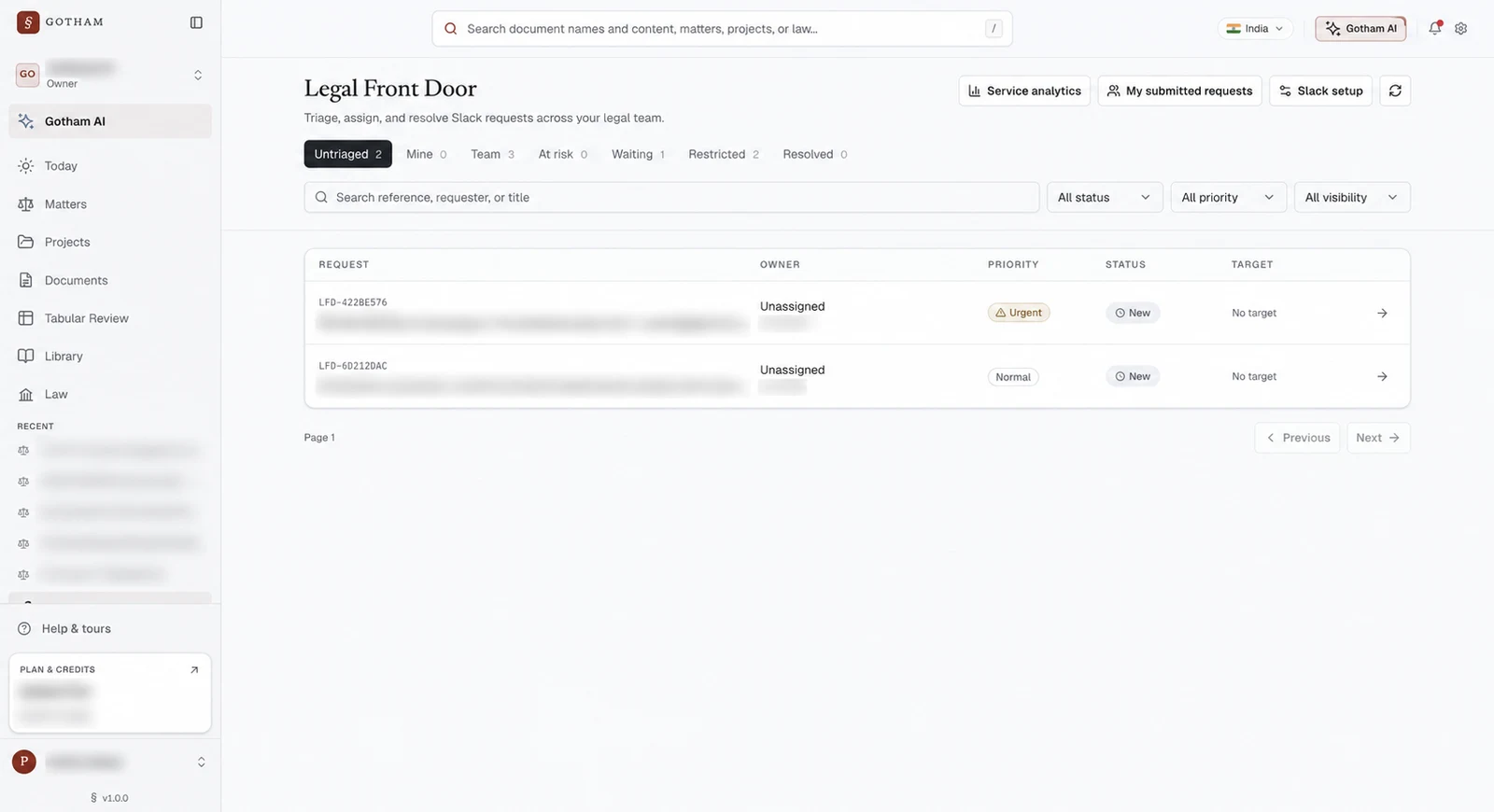
The live Legal Front Door interface with request details and account information blurred. This is a Slack request queue; it illustrates intake and assignment controls rather than autonomous email monitoring or legal-notice detection.
Capture the notice and build the matter context
For email-originated notices, agree the capture path first. Your team can place the notice and relevant attachments into the appropriate authorised Gotham document or matter context, preserving receipt evidence alongside them. Test any proposed email integration against your actual mailbox and attachment requirements before relying on it.
Gotham's current Legal Front Door should be evaluated for the intake channels it supports. A Slack request queue does not by itself establish continuous Gmail or Outlook monitoring. The email-to-Gotham handoff is an implementation step to scope and verify with your team.
Use AI and workflows to prepare reviewed work
With the material available in context, ask Gotham to identify the stated demands, dates, relevant contract provisions and missing facts, with source references. Use the output to support counsel's review and organise fact collection or response preparation.
A reusable workflow can structure the analysis, required inputs and human decisions. Review the resulting work product against the notice and governing materials. An internal service target in intake remains distinct from a confirmed legal response deadline in the matter.
Set reminders on the reviewed matter date
Gotham's matter date reminders support in-app and email notifications, a matter-level or date-specific cadence and eligible recipients. Automatic recipients follow matter owners, leads and the confirming user. The Date reminders panel lets an authorised user inspect the settings for the particular date.
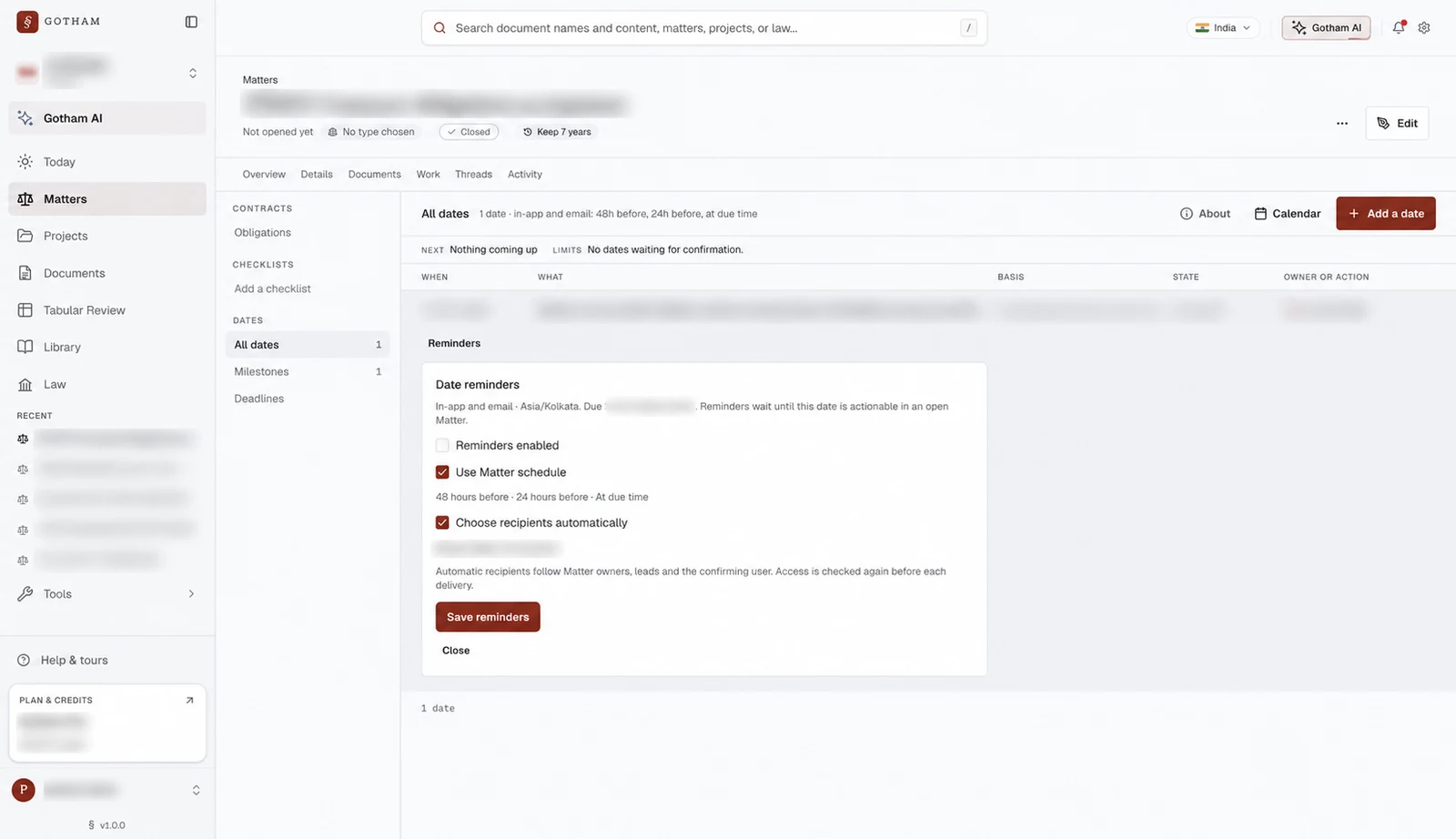
Reminder configuration from an existing closed test matter, with private details blurred. Reminders are disabled in the capture. Delivery requires an actionable date in an open matter and eligible recipients.
This provides the reviewed-date reminder part of the process. Confirm the appropriate matter owner, reminder settings and delivery behaviour during setup. Design any additional acknowledgement or escalation steps explicitly, then test them before treating them as active controls.
For recurring contract duties that arise alongside notices, see how to turn contract obligations into reminders and workflows.
How to evaluate a notice workflow before relying on it
Use a labelled sample your legal team has reviewed. Include clear notices, ordinary business correspondence, short-deadline attachments, scanned documents, forwarded threads, duplicates and incomplete imports. Evaluate the complete path from capture to owner action.
| Check | Evidence to examine |
|---|---|
| Candidate detection | Material notices found and missed, plus unnecessary urgent flags |
| Attachment coverage | Which attachments were read and how failures appeared |
| Assignment | Correct owner, backup coverage and time spent unassigned |
| Deadline review | Correct source, trigger, calculation and reviewer confirmation |
| Notification | Correct recipient, settings, delivery result and failed-delivery recovery |
| Response completion | Approved response, dispatch proof and unresolved follow-up |
Run the test with the permissions, channels and people who will operate the process. A successful demonstration using one manually uploaded notice establishes a smaller scope than continuous monitoring across several mailboxes.
Common questions about urgent legal notice alerts
Can software tell us that a notice has been validly served?
It can preserve receipt facts and flag relevant material. Qualified counsel must assess service and its legal effect using the complete facts and applicable requirements.
Can we start triage before the response deadline is confirmed?
Yes. Set an internal review target and assign an owner while the legal timing question is investigated. Label that target clearly so it cannot be mistaken for the confirmed response deadline.
Does Gotham automatically monitor every legal mailbox?
Mailbox monitoring is a separate capture capability to establish for your environment. Gotham's live Legal Front Door currently centres on Slack requests; its document, workflow and matter reminder capabilities support the downstream reviewed process.
How can Gotham help us implement this workflow?
Bring representative notices, receipt evidence, your owner-routing policy and a set of deadlines counsel has already reviewed. We can scope the capture handoff, matter organisation, review steps and reminder settings with your team. Talk to Gotham about a notice response workflow and evaluate each handoff before extending it to live operational reliance.