
To turn contract obligations into reminders and workflows, extract each actionable commitment with its source clause, verify the trigger and timing rule, assign an accountable owner, and approve the resulting dates. Then attach reminders, preparation steps, review decisions and completion evidence to that record. Keep conditional duties pending until the triggering facts are known.
Consider an agreement requiring an annual insurance certificate, a quarterly service report and written notice before renewal. These are three different operating processes. A calendar entry containing the contract expiry date cannot tell the insurance owner what to deliver, explain how a quarterly reporting deadline was calculated, or give procurement enough time to make a renewal decision.
This guide walks through the conversion from clause to action, using a hypothetical services agreement, and then shows how Gotham supports that work. For a broader governance framework, read our contract obligation management guide.
What does a contract obligation reminder workflow look like?
Use this sequence for each independently actionable commitment:
- Extract: preserve the required action and exact source clause.
- Verify: review the operative agreement, trigger and deadline calculation.
- Assign: name the accountable owner and backup.
- Schedule: approve the date, recurrence and reminder cadence.
- Act: collect inputs, prepare the deliverable and obtain approval.
- Evidence: record completion, delivery proof and any continuing duty.
The detailed steps below explain how to set up each part and handle missing triggers, amendments and recurring obligations.
What has to exist before a contract reminder can be trusted?
A useful reminder answers five questions: what must happen, who owns it, when it must happen, why that date applies, and what will prove completion. Its underlying record should also identify the executed document and the reviewer who approved the interpretation.
| Record element | What to capture | Why it matters |
|---|---|---|
| Source | Executed agreement, version, clause and exact quotation | Lets the reviewer check the operative language |
| Required action | A specific deliverable or decision | Gives the owner something they can perform |
| Timing | Trigger, calculation, timezone and recurrence | Explains the date instead of merely displaying it |
| Ownership | Contractual party, internal owner and reviewer | Separates legal responsibility from internal execution |
| Completion | Required proof, status and next step | Makes the record useful after the reminder arrives |
Keep a right or option labelled as such. A right to terminate may require a decision and notice workflow, but it is different from a duty to provide a report. Distinguishing them helps avoid reminders that imply the organisation has already decided to exercise a right.
Step 1: Assemble the operative contract set
Start with the signed agreement, schedules, order forms, amendments and relevant notices. Identify the legal entity and the business relationship. Confirm which version governs the obligation being extracted, including any precedence provisions.
An amendment might change a reporting date while leaving the rest of the agreement untouched. An order form might have its own term. A signature date may differ from the commencement date. These distinctions affect which event starts the clock.
Keep the original documents accessible to authorised reviewers. Record unresolved gaps, such as a missing schedule or unreadable scan, before approving affected obligations. Our contract data extraction guide covers the review that should follow automated extraction.
Step 2: Extract independently actionable obligations
Translate a clause into an action that a colleague can carry out without stripping away its conditions. One clause may create several records; several connected clauses may explain one obligation.
For example, an annual insurance provision could create an operational action to obtain current certificates and a separate action to deliver them through the agreed channel. Both need a clear owner, but delivery requires different completion evidence from obtaining the document.
Ask an extraction tool to propose the following fields:
- The required action and obligated party.
- The source quotation and precise clause or page reference.
- Any condition, exception or dependency.
- The trigger event and stated time period.
- A proposed internal owner role.
- The evidence needed to close the action.
- Any question that prevents activation.
Treat the result as a review queue. A plausible summary can still omit a qualifier, apply an outdated amendment or confuse the recipient with the performing party.
Step 3: Separate the trigger from the due date
Some duties have a fixed date. Others become calculable only when an event happens. Store the rule even when the current due date is unknown.
| Timing type | Hypothetical clause | Appropriate handling |
|---|---|---|
| Fixed | Provide a certificate by 31 October 2026 | Verify the date and schedule preparation |
| Recurring | Submit a report by the tenth day after each quarter end | Review the cycle, first occurrence and end condition |
| Event-driven | Return materials within ten days after termination | Wait for a confirmed termination event |
| Notice window | Give written notice at least 90 days before term end | Calculate the reviewed notice deadline and an earlier decision date |
| Conditional | Supply an additional report if a threshold is exceeded | Preserve the condition and identify who confirms it |
The phrase “business days” needs the agreement's definition and any applicable calendar convention. A date-only record also needs an operational reminder time and timezone. Those settings should never silently become a legal interpretation of an unspecified time of day.
For Indian agreements, the Indian Contract Act, 1872 on India Code is a primary reference for contractual performance and time for performance. The particular agreement and relevant law still govern the review of each record.
Step 4: Assign an owner who can act
Record the contractual party separately from the internal owner. The supplier may owe the insurance certificate, while your procurement manager owns the internal follow-up and legal reviews any disputed response.
An owner should receive the clause, required action, due logic, dependencies and expected proof. Give them a practical way to flag an incorrect assignment or a missing prerequisite. A shared inbox can support coverage, but it should have a named accountable role behind it.
For a renewal, procurement may collect commercial input, the business sponsor may recommend a decision and counsel may approve the form of notice. Represent those handoffs explicitly. Assigning the entire process to “Legal” makes it difficult to see where work is actually blocked.
Step 5: Build reminders around preparation and decisions
Work backwards from the reviewed deadline. Identify how long the owner needs to obtain information, prepare the deliverable, secure approval and complete delivery. Use those steps to choose reminder points.
A renewal notice due in 90 days may require a commercial decision much earlier. A certificate already held on file may need only a short verification step. The same cadence will rarely suit both.
A reminder should include a direct link to the obligation or matter, the required next action, the confirmed timing basis and the owner. Limit sensitive information in notification previews. Keep full documents and privileged analysis behind the appropriate access controls.
For the hypothetical annual certificate, an actionable reminder could read:
Action: Obtain and review the supplier's current insurance certificate. Owner: Procurement. Confirmed due date: 31 October 2026. Next step: Upload the certificate for risk review. Source and completion record: Open the linked contract obligation.
The live notification should contain only details its recipients are authorised to see. Keep the clause quotation and supporting documents in the controlled record when the notification channel has a wider audience.
Where a team uses Gmail for preliminary sorting, Google's filter documentation explains labelling and automatic forwarding. Those functions can support intake; the approved obligation record should remain the place where ownership, deadline reasoning and completion are maintained.
Step 6: Turn the reminder into a workflow
A workflow defines the work between the first alert and completion. A practical renewal sequence might be:
- Ask the business owner whether the service is still required.
- Collect spend, performance and proposed commercial changes.
- Prepare a renewal or non-renewal recommendation.
- Route the decision and any notice wording for approval.
- Deliver the approved notice using the required method.
- Save dispatch and receipt evidence.
- Update the contract record and review the next applicable dates.
Choose a separate path for missing information, disagreement or a likely delay. Define who can approve a change and what evidence is needed. Sending another identical reminder does little to resolve a blocked commercial decision.
For obligations connected to invoices or payment approvals, our contract obligation payment workflow explains how to preserve the relationship between the contract requirement and the finance process.
Worked example: An annual insurance certificate
Assume a hypothetical services agreement requires the supplier to provide current insurance certificates by 31 October each year. Legal verifies the clause and the applicable agreement version. Procurement owns obtaining the documents; risk reviews whether they satisfy the requirement.
The reviewed register preserves the quotation, annual recurrence and first approved occurrence. An internal preparation task asks procurement to contact the supplier before the due date. The completion standard requires the received certificate and a recorded review outcome.
If a certificate arrives with an expired policy period, receipt alone does not close the task. The owner records the issue and requests a corrected document. If this year's occurrence is completed, next year's requirement remains active unless the agreement or an authorised decision changes it.
This distinction between a continuing obligation and an individual occurrence is essential. Completing the October task should not accidentally end the annual schedule.
How Gotham helps turn clauses into accountable work
Gotham is an AI workspace for legal and accounting teams. It brings documents, matters, source-linked analysis and reusable workflows together so reviewed findings can move into operational work with their context attached.
For contract obligations, the product connects document selection, extraction review, activation, recurring schedules and matter dates. Your team retains the review decisions that establish what the agreement requires and when an obligation becomes actionable.
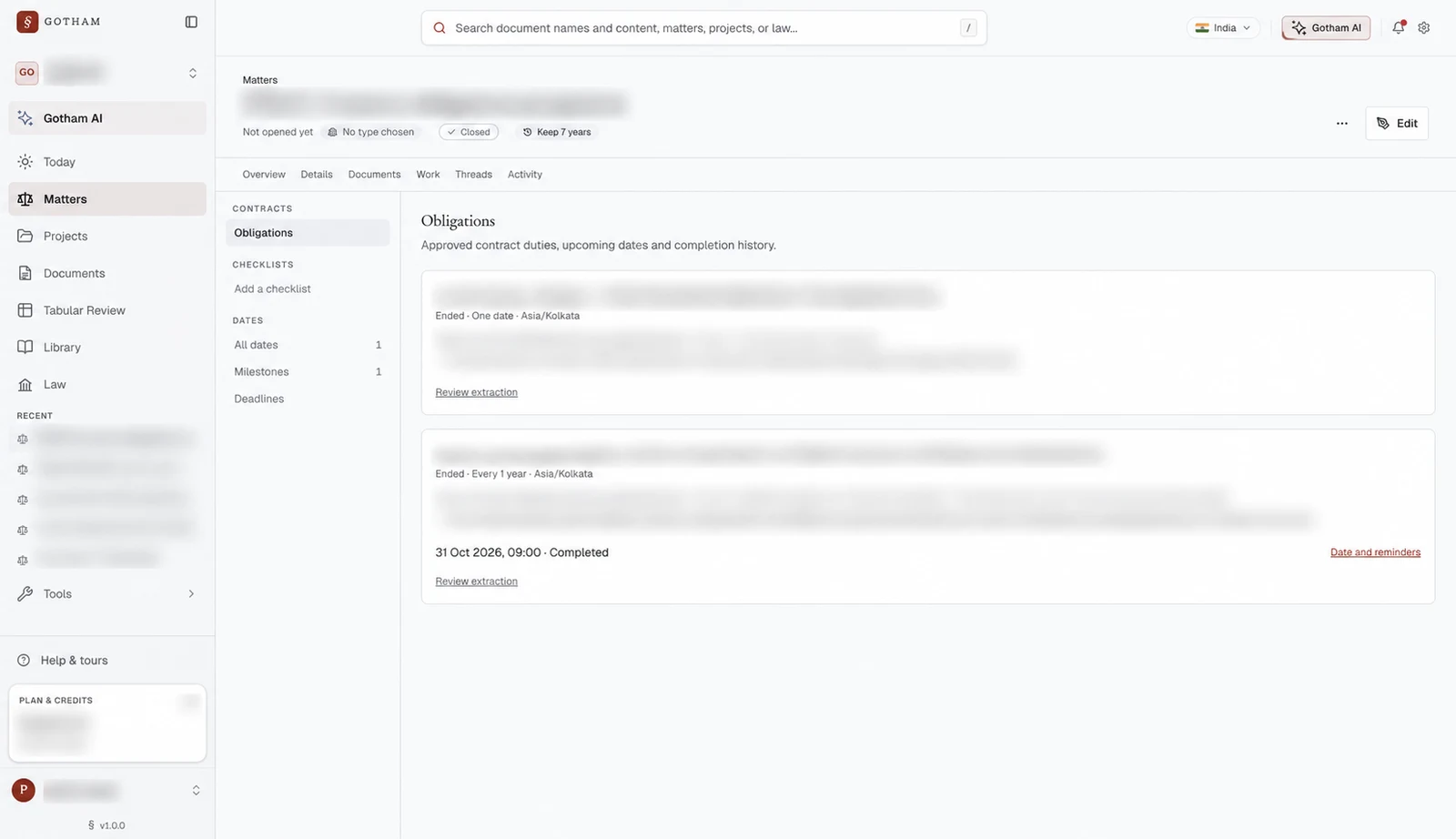
Gotham's live Obligations view, captured from an existing acceptance-test matter. Matter names, document details and contract text are blurred. The pictured schedules have ended; the screenshot illustrates the record structure and retained history.
Start from the contract documents
Select the relevant contract documents in a matter's Documents view and choose Track obligations. In workspaces where it is available, Gotham opens the Contract portfolio obligations and renewals workflow with those documents and the matter as context.
The workflow is intended to extract source-backed obligations for review while preserving conditions and repeat rules. Its availability depends on the workflow being published and accessible to your workspace.
Review the proposed register before activation
The register presents the action, date, basis, owner and state. Items that still need a trigger, date, basis or recurrence review remain visibly unresolved. Review the source and correct the record before activating the obligation.
An actionable, source-backed item can be confirmed into the matter's dates. Approved supported recurrence rules can create future occurrences. Event-dependent duties require their triggering facts to be resolved before they become actionable dates.
Configure reminders for the confirmed date
Gotham provides in-app and email reminders for actionable dates in open matters. The Date reminders panel shows timing, timezone and recipients. It supports the matter's schedule or a date-specific cadence, along with automatic or selected eligible recipients.
The default cadence is 48 hours before, 24 hours before and at the due time. It is an operational default to review against the task. Automatic recipients follow matter owners, leads and the confirming user; access is checked again before delivery.
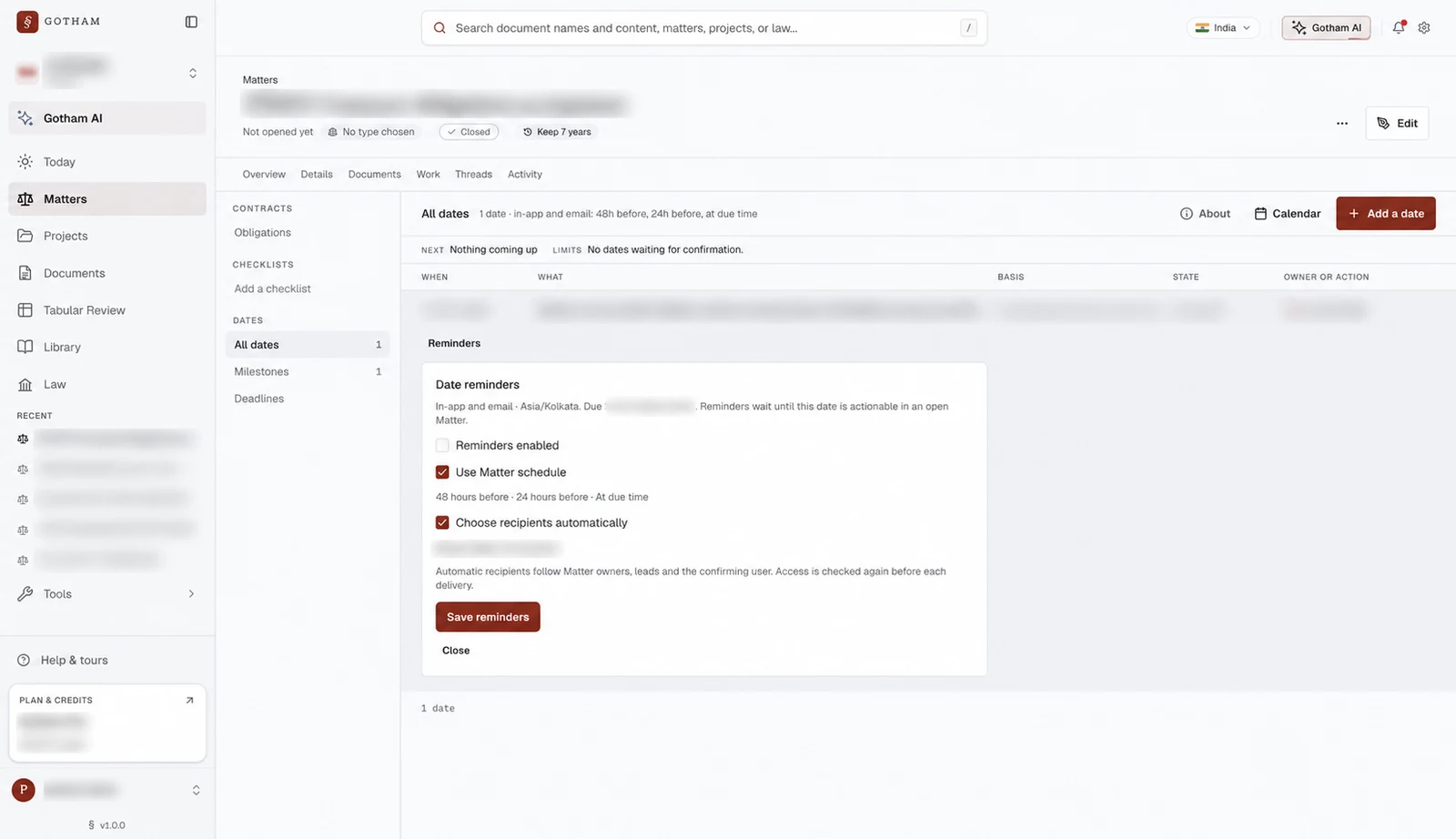
The reminder configuration panel in the same closed test matter. Reminders are disabled in this capture. A saved schedule needs an actionable date, an open matter and eligible recipients before delivery.
Manage continuing duties and their history
The Obligations view shows approved duties, source references, upcoming dates and completion history. Authorised users can pause or resume tracking, complete an occurrence or end a schedule. Completing one occurrence keeps future scheduled dates separate from that completed task.
Use this foundation with a reviewed Gotham workflow to organise the related analysis, inputs and approvals. Agree which decisions require a person and verify the resulting records before treating the process as operating successfully.
How should you test the process before extending it?
Start with one agreement family and a small set of known obligations. Include a fixed date, a recurring duty, an event-dependent action and an amendment that changes timing.
Check whether each material obligation was found, its source link is accurate and its qualifiers survived extraction. Verify the calculated dates independently. Ask owners whether the next action is understandable, then test reminder configuration and delivery using an appropriate future actionable date.
Finally, complete one occurrence, pause another and review the retained history. Measure reviewer corrections, missed obligations, wrong dates and unclear assignments. These checks reveal whether the process supports real work beyond producing a polished first register.
Common questions about contract reminders
Can AI activate every extracted deadline automatically?
Keep a review gate for material contractual interpretation. AI can propose obligations and fields; an authorised reviewer should confirm the source, trigger and calculation before a proposed record drives reminders or action.
What happens when a trigger has not occurred?
Keep the obligation pending with its condition and required trigger evidence. Assign someone to obtain or confirm the missing fact. A guessed trigger date can create a confidently wrong schedule.
Should a renewal alert use the expiry date?
It should reflect the reviewed notice window and the internal decision process. Expiry is one reference point; the latest date to deliver notice and the earlier date to reach a decision are separate records.
Can Gotham help us set this up?
Bring one agreement family, its amendments and the people who own the resulting actions. We can map the extraction, review, activation and reminder process with your team. Talk to Gotham about a contract obligation workflow and test it against the obligations your team already knows it must manage.